
Blog
Configure blog archive, post layout, and display settings.
These settings apply to the whole site, so a change here is visible on every page that uses the feature. Find them under Canvas > Theme Options, in the Blog tab.
The tab sits in the rail on the left of the screen, with its own panel beside it:
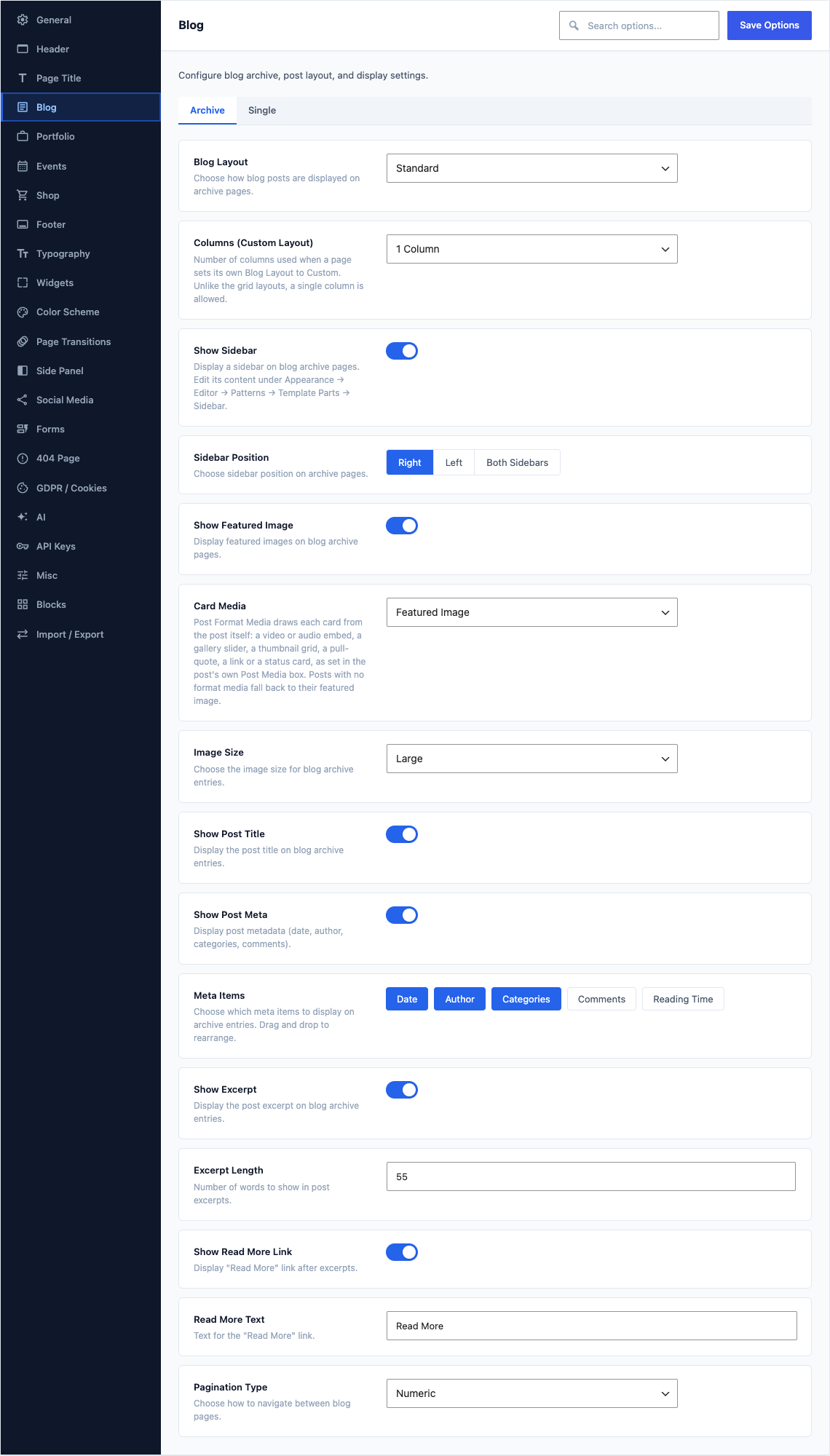
Archive
This group holds the following settings:
Blog LayoutDefaultStandard
Choose how blog posts are displayed on archive pages.
ChoicesStandardGridSmall ThumbsSmall Thumbs AltList - Overlay CardList - HorizontalList - MinimalMasonryTimeline
ColumnsDefault3 Columns
Number of columns for grid and masonry layouts.
Choices2 Columns3 Columns4 Columns5 Columns6 ColumnsShown when Blog Layout is "Grid" or "Masonry"
Columns (Custom Layout)Default3 Columns
Number of columns used when a page sets its own Blog Layout to Custom. Unlike the grid layouts, a single column is allowed.
Choices1 Column2 Columns3 Columns4 Columns5 Columns6 Columns
Show SidebarDefaultOff
Display a sidebar on blog archive pages. Edit its content under Appearance → Editor → Patterns → Template Parts → Sidebar.
Sidebar PositionDefaultRight
Choose sidebar position on archive pages.
ChoicesRightLeftBoth SidebarsShown when Show Sidebar is on
Show Featured ImageDefaultOn
Display featured images on blog archive pages.
Card MediaDefaultFeatured Image
Post Format Media draws each card from the post itself: a video or audio embed, a gallery slider, a thumbnail grid, a pull-quote, a link or a status card, as set in the post's own Post Media box. Posts with no format media fall back to their featured image.
ChoicesFeatured ImagePost Format MediaShown when Show Featured Image is on and Blog Layout is "Standard" or "Grid" or "Small Thumbs" or "Small Thumbs Alt" or "List - Overlay Card" or "List - Horizontal" or "Masonry" or "Timeline"
Image SizeDefaultLarge
Choose the image size for blog archive entries.
ChoicesThumbnailMediumMedium LargeLargeFullShown when Show Featured Image is on and Blog Layout is "Standard" or "Grid"
Show Post TitleDefaultOn
Display the post title on blog archive entries.
Show Post MetaDefaultOn
Display post metadata (date, author, categories, comments).
Meta ItemsDefaulta preset list of 3 rows
Choose which meta items to display on archive entries. Drag and drop to rearrange.
ChoicesDateAuthorCategoriesCommentsReading TimeShown when Show Post Meta is on
Show ExcerptDefaultOn
Display the post excerpt on blog archive entries.
Excerpt LengthDefault
55Number of words to show in post excerpts.
Shown when Show Excerpt is on
Show Read More LinkDefaultOn
Display "Read More" link after excerpts.
Read More TextDefault
Read MoreText for the "Read More" link.
Shown when Show Read More Link is on
Pagination TypeDefaultNumeric
Choose how to navigate between blog pages.
ChoicesDefault (Previous/Next)NumericLoad More ButtonInfinite Scroll
Single
This group holds the following settings:
Single Post LayoutDefaultDefault (Sidebar)
Choose the layout variant for single blog posts.
ChoicesDefault (Sidebar)Full WidthSmall Image (Inline)Split (Hero Above)
Show SidebarDefaultOn
Display sidebar on single blog post pages.
Shown when Single Post Layout is "Default (Sidebar)" or "Split (Hero Above)"
Sidebar PositionDefaultRight
Choose sidebar position on single posts.
ChoicesRightLeftBoth SidebarsShown when Show Sidebar is on
Show Featured ImageDefaultOn
Display featured image on single blog posts.
Image SizeDefaultFull
Choose the image size for single post featured images.
ChoicesMedium LargeLargeFullShown when Show Featured Image is on and Single Post Layout is "Default (Sidebar)" or "Full Width" or "Split (Hero Above)"
Show Post MetaDefaultOn
Display post metadata on single posts.
Meta ItemsDefaulta preset list of 4 rows
Choose which meta items to display on single posts. Drag and drop to rearrange.
ChoicesDateAuthorCategoriesCommentsReading TimeShown when Show Post Meta is on
Show Reading BarDefaultOn
Display reading time, font sizer, print, and share buttons below content.
Show TagsDefaultOn
Display post tags below content.
Show Share ButtonsDefaultOn
Display social sharing buttons on single posts.
Share NetworksDefaulta preset list of 5 rows
Choose which social networks to show in the share section.
ChoicesFacebookTwitter / XLinkedInPinterestEmailShown when Show Share Buttons is on
Show Post NavigationDefaultOn
Display previous/next post navigation.
Show Author InfoDefaultOn
Display author information box on single posts.
Show Related PostsDefaultOn
Display related posts section on single posts.
Related Posts CountDefault
2Number of related posts to display.
Shown when Show Related Posts is on
Related Posts ColumnsDefault2 Columns
Number of columns for related posts grid.
Choices2 Columns3 Columns4 ColumnsShown when Show Related Posts is on
Show CommentsDefaultOn
Display the comments section on single posts.