
Typography
Customize fonts and typography settings.
These settings apply to the whole site, so a change here is visible on every page that uses the feature. Find them under Canvas > Theme Options, in the Typography tab.
The tab sits in the rail on the left of the screen, with its own panel beside it:
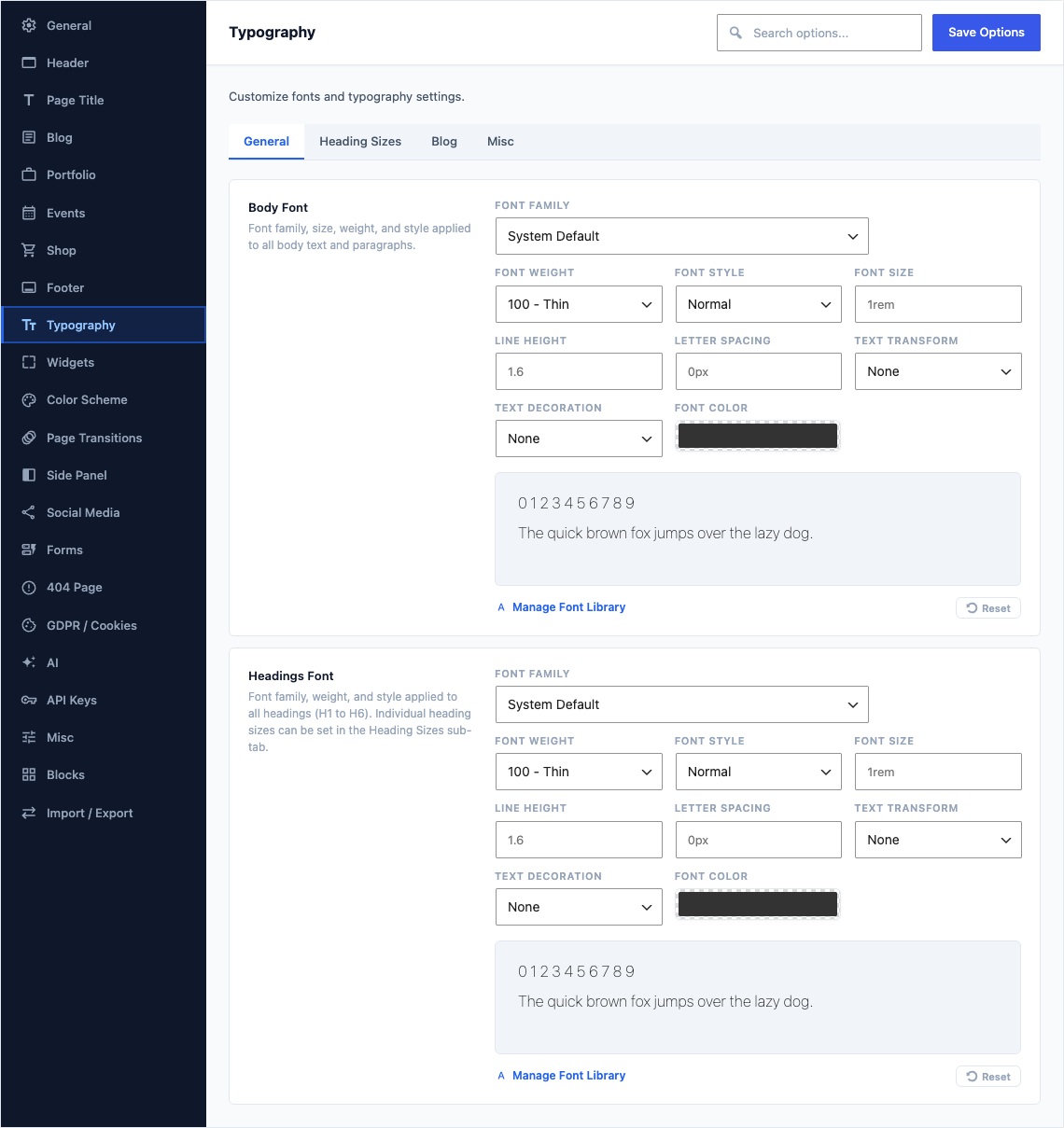
General
This group holds the following settings:
Body FontDefaulta preset list of 9 rows
Font family, size, weight, and style applied to all body text and paragraphs.
Headings FontDefaulta preset list of 9 rows
Font family, weight, and style applied to all headings (H1 to H6). Individual heading sizes can be set in the Heading Sizes sub-tab.
Heading Sizes
This group holds the following settings:
H1 Font SizeDefaultEmpty
Size of every H1 heading across the site, written as a length such as 2rem or 28px. Change it to set the step between one heading level and the next. Leave empty for the theme default of 2.25rem.
H2 Font SizeDefaultEmpty
Size of every H2 heading across the site, written as a length such as 2rem or 28px. Change it to set the step between one heading level and the next. Leave empty for the theme default of 1.875rem.
H3 Font SizeDefaultEmpty
Size of every H3 heading across the site, written as a length such as 2rem or 28px. Change it to set the step between one heading level and the next. Leave empty for the theme default of 1.625rem.
H4 Font SizeDefaultEmpty
Size of every H4 heading across the site, written as a length such as 2rem or 28px. Change it to set the step between one heading level and the next. Leave empty for the theme default of 1.375rem.
H5 Font SizeDefaultEmpty
Size of every H5 heading across the site, written as a length such as 2rem or 28px. Change it to set the step between one heading level and the next. Leave empty for the theme default of 1.125rem.
H6 Font SizeDefaultEmpty
Size of every H6 heading across the site, written as a length such as 2rem or 28px. Change it to set the step between one heading level and the next. Leave empty for the theme default of 0.875rem.
Blog
This group holds the following settings:
Post Title FontDefaulta preset list of 9 rows
Font family, size, weight, and style applied to blog post titles on archive and single pages.
Post Meta Font SizeDefaultEmpty
Size of the small line that carries a post date, author and categories. Written as a length such as 0.875rem or 14px, or as a percentage of the surrounding text such as 90%. Leave empty for the theme default of 90%.
Post Meta ColorDefaultEmpty
Text color for post meta information. Leave empty for the theme default.
Misc
This group holds the following settings:
Copyright Font SizeDefaultEmpty
Font size for the copyright bar text, e.g. "0.875rem" or "14px". Leave empty for the theme default (0.875rem).
Blockquote Font SizeDefaultEmpty
Font size for blockquote elements, e.g. "1.375rem" or "22px". Leave empty for the theme default (uses H4 size).
Custom Typography RulesDefaultEmpty
Set the font, size, weight and colour of any element on the site that the tabs above do not already cover, such as widget titles. Each rule you add applies to the elements named in its own selector.